

Quality in, quality out. We opened our original Google Merchant feed guide with that line, and a few years later it still holds up. What has changed is how much Google expects your feed to do.
A well-optimized feed has always helped Google understand what your business sells, how much it costs, and whether it is available. Now that same product data can help Google answer detailed shopping questions and even rewrite the title shown in an ad to better match what someone searched.
Google reports that the average AI Mode query is three times longer than a traditional Google search. Adobe also found that traffic from generative AI tools to U.S. retail sites increased 693.4% year over year during the 2025 holiday season. Adobe notes that AI traffic still starts from a smaller base, but shoppers are clearly getting more comfortable using these tools to research and compare products. Shoppers are giving Google more context. Retailers need to return the favor with their product data.
AI Optimized Product Titles
Google has introduced AI product titles through their new text customization feature. When text customization is turned on, Google can adjust the product title shown in an ad based on the shopper's search. It pulls from the Merchant Center feed and the product page, then uses the version it predicts will perform best.

Currently, the feature is only available through the AI Max for Shopping beta and is limited to English-language feeds. Google has announced that product-title optimization is also coming to Performance Max, so we expect availability to expand beyond the current beta. Google reports that advertisers using AI Max for Shopping typically see 5% more conversions or conversion value at a similar cost per acquisition or return on ad spend. That result comes from Google's own 2026 retail data, so treat it as an encouraging benchmark instead of a promise.
The main thing to flag with this feature is that Google needs product details included in the feed to make the most of text customization. For example, if the feed and product page never mention that a boot is waterproof or made of leather, the AI might never show those products for those types of queries. It also would not include those features in the product title to entice users to click.
Before testing AI titles, make sure priority products have accurate product types, materials, colors, sizes, and key features. Then review the product titles report to see what Google actually served. Advertisers can also use term exclusions and messaging restrictions if certain language or claims need to stay out of their ads.
Our recommendation is to test the beta with a controlled group of products and let your own performance decide whether it deserves a larger rollout.
Conversational Attributes Give Google More to Work With
Google Merchant Center also introduced a group of conversational attributes built to help AI systems understand details that may not fit neatly into a standard product title or description. These fields are optional, and adding them will not affect the approval status of products already in Merchant Center.
There are currently six conversational attributes available:
Question and answer: Add common questions about fit, compatibility, care, assembly, ingredients, or product use.
Document link: Connect the product to a relevant PDF, such as a manual, sizing guide, or care guide.
Related product: Identify accessories, required parts, or products that are often purchased together.
Item group title: Give a group of product variants one clear parent title.
Variant option: Spell out what changes between variants, such as size, color, width, scent, or material.
Popularity rank: Tell Google how popular the product is compared with the rest of your inventory.
The question-and-answer field is probably the most interesting place to start. A title can tell someone that a jacket is waterproof. A Q&A can answer whether it can handle heavy rain, how it fits over layers, or whether it can go in the washing machine. Those are the kinds of details that come up when shoppers move from a short keyword to a full question through AI search. Luckily, most brands already have a source for this information. Customer service emails, product reviews, on-site search data, FAQs, size guides, and manuals can all show what people want to know before buying.
Google recommends using a supplemental data source for these attributes, although they can also be added to the primary feed or submitted through the Merchant API. We recommend starting with a smaller group of best sellers and products that generate frequent questions. There is no need to rebuild the entire catalog on day one.
One thing to keep in mind: Google specifically says there is no need to repeat information already included in the description, product highlight, or product detail fields. Use conversational attributes to fill gaps in your data feed, not to copy and paste the same product copy into one more place.
Custom Labels Should Help You Make a Decision
Conversational attributes help Google understand the product. Custom labels help us decide how to advertise it.
Google gives advertisers five custom-label fields that can be used to group products for reporting and bidding. The values stay behind the scenes, so shoppers will never see them. The real question is what information would cause your team to change a bid, budget, product group, exclusion, or report.
Below are seven useful options to consider. Since only five custom-label fields are available, choosing the ones that fit your business is important. Skip custom labels entirely, and those insights stay on the table.
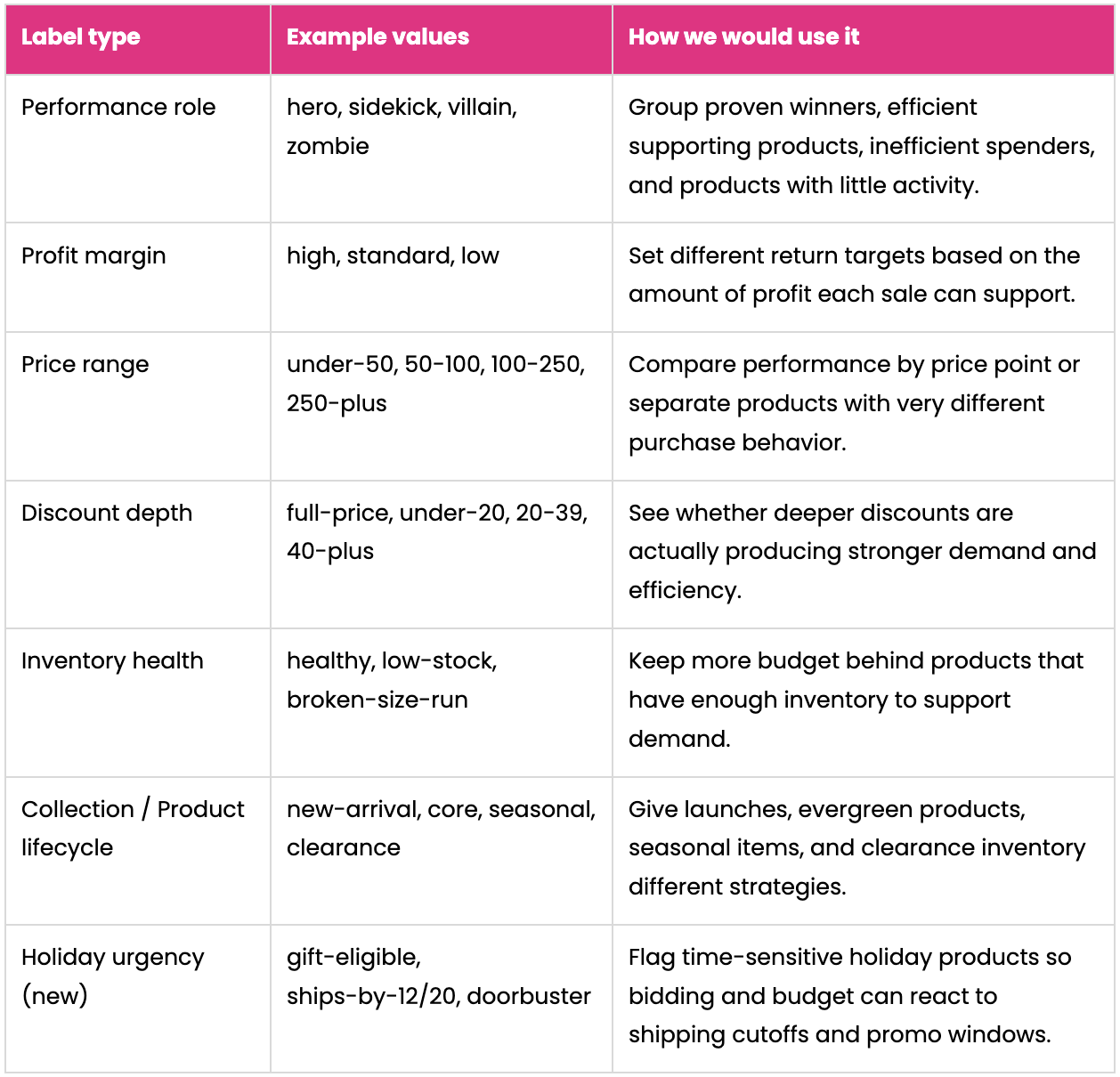
The holiday urgency label is built specifically for Q4. A ships-by-12/20 label lets you pull back or reallocate budget on a product the moment it can no longer arrive in time for the holiday, instead of finding out from a customer complaint. A gift-eligible label lets you push budget toward the products most likely to convert during gift-buying weeks.
Meet the Heroes Sidekicks Villains and Zombies
The performance label is one of our favorites because it gives every product a pretty clear role. Heroes drive meaningful sales at an efficient return. Sidekicks are efficient but contribute less volume. Villains spend money without meeting profitability goals. Zombies barely generate traffic or sales.
The labels become useful when they change how products are managed in Google Ads. You can use listing groups inside a campaign when you want cleaner reporting or the ability to include and exclude certain products. If a group needs its own budget or bidding target, a separate campaign gives you more control.
For example, a hero campaign could receive more budget or a lower tROAS bid so Google can bid more aggressively on proven products. Keeping sidekicks separate can prevent heroes from absorbing most of the spend. Zombies could move into a small test campaign with a defined budget and lookback window, giving products that rarely receive impressions a real chance to perform. Villains can be isolated or excluded from broader prospecting while you review the bids, pricing, margin, title, and landing page.
Use a consistent lookback window and give new products enough time to collect data before assigning a role. Whenever possible, automate these labels through feed rules, supplemental data, or a feed-management platform. A performance label that has not been updated since last quarter is not doing anyone much good.
Custom labels do not improve query matching on their own. They organize products inside Google Ads, nothing more. If a label does not lead to a real decision, it probably does not deserve one of the five available fields.
Get the Feed Ready Before Q4 Gets Busy
Feed problems are an issue at any point throughout the year, but none more impactful or costly than during the Holiday shopping period. A few checks now can prevent disapprovals, wasted clicks, and last-minute scrambling once promotions are live.
Submit Promotional Data Early
Use the sale price and sale price effective date fields when the original price is still visible on the product page and a temporary sale price is displayed. Include the start time, end time, and correct time zone so the feed changes when the promotion does. Merchant promotions should also be submitted early enough to clear review before launch.
Look Beyond In Stock and Out of Stock
A product can technically be in stock and still be a poor item to advertise. A sweater available only in XS and 3XL, for example, may continue collecting clicks even though most shoppers cannot buy their size.
For products with multiple variants, look at the percentage of variants that are actually available. An inventory-health custom label can help identify low-stock products and broken size runs so you can reduce spend until the assortment improves.
Prioritize the Products Carrying the Season
You may not have time to enrich every product before Q4, and that is okay. Start with best sellers, new releases, high-margin products, and the items featured in your holiday promotions. Make sure those products have strong titles, useful descriptions, complete identifiers, accurate variant data, and enough images to show the item clearly.
Make Sure the Website and Feed Agree
Increase feed-update frequency where it makes sense and confirm that price and availability on the product page match what Merchant Center receives. Review product and variant URLs, shipping rates, delivery estimates, and Merchant Center warnings before campaigns ramp up.
If you test Final URL Expansion as part of AI Max for Shopping, review your tracking templates too. Google notes that some tracking parameters can create broken landing pages or incomplete attribution when the system selects a different URL.
The Bottom Line
Google is giving retailers new ways to use product data, but the main takeaway is familiar: quality in, quality out. AI-generated titles can get more mileage from a strong feed. Conversational attributes give Google more detailed information to work with. Custom labels help your team put budget behind the products that make the most sense for the business. With Q4 approaching, now is a good time to test these newer features and clean up the feed inputs you already control.
If you have questions about whether your product feed is ready for Q4, or you want help building a custom-label strategy for your Shopping and Performance Max campaigns, reach out to the Revel team. We are happy to help identify the updates most likely to improve performance for your business.